
# Adding a Suggestion Pot
Suggestion Pots are a tool for SBGL employees to submit feedback about the working practices in SBGL and aspects of them that could be improved.
To add a new Suggestion Pot:
- Click the Suggestion Pots tab (highlighted below)
- Click the Add New Suggestion Pot sub-tab (highlighted below)
- Enter the post title in the "Add title" field
- Select the Suggestion Pot icon from the Pot Icon dropdown (highlighted below)
- Pick a category from the Categories dropdown to group this pot by (higlighted below)
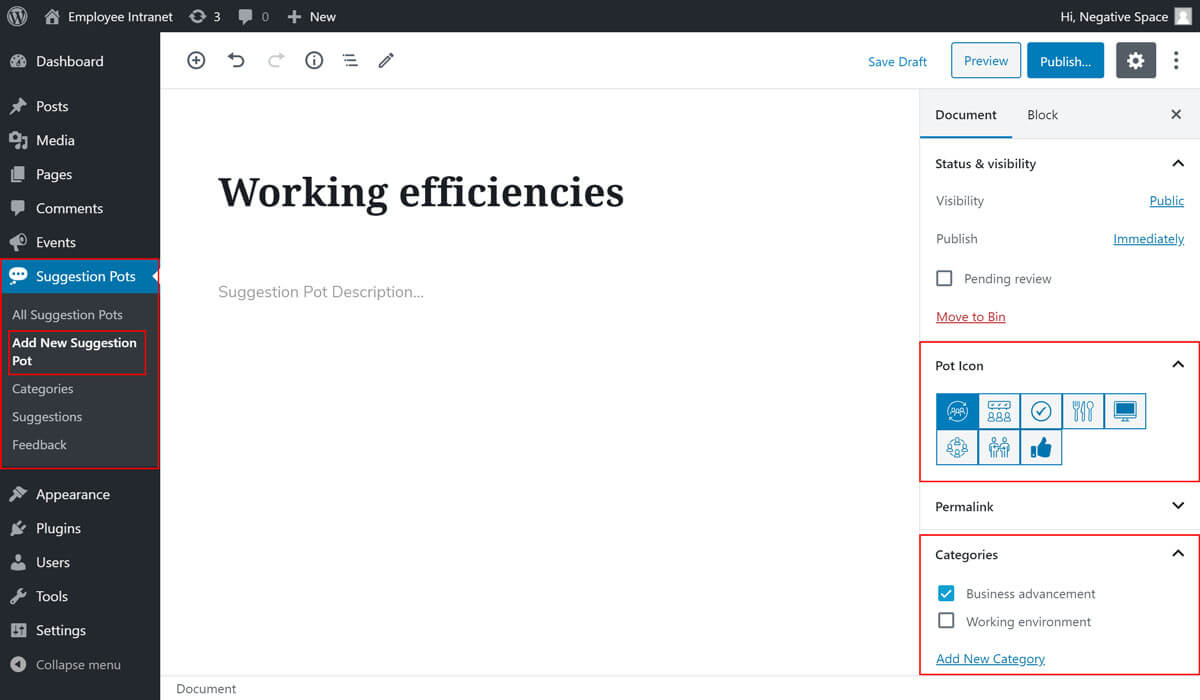
The selections in the Suggestion Pot shown above would result to the following button in the Suggestion Pot Buttons:
